# Insert Data in PHP Ajax MySQL By Using Bootstrap Modal

- Link: https://technotaught.com/insert-data-in-php-ajax-mysql-by-using-bootstrap-modal/
- Published: 2021-01-03T04:00:00+05:30
- Author: Ashishkumar Vishwakarma

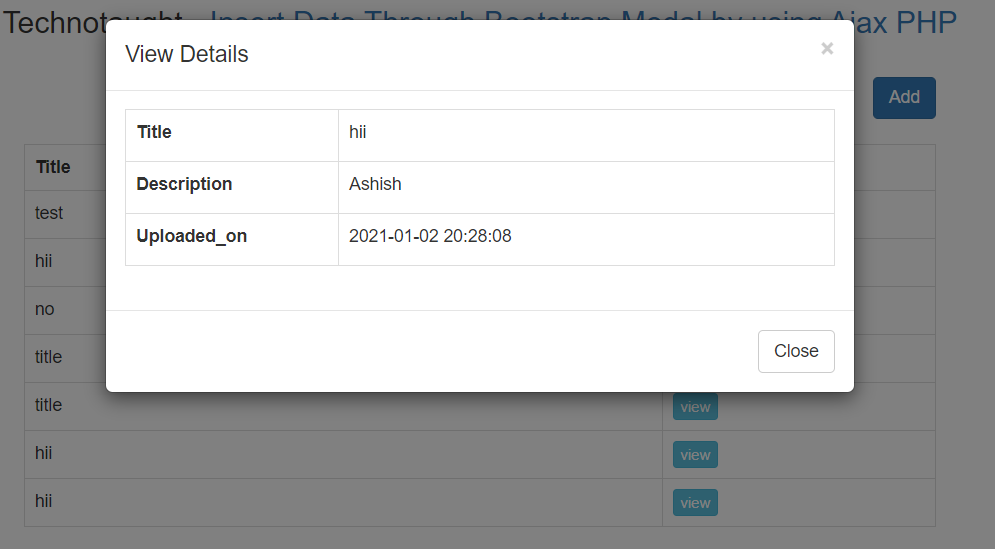
In this tutorial, we will Insert and view data in modal using PHP Ajax MySQL table
along with Javascript/ Sweet alert through Bootstrap Modal by using PHP script with
Ajax jquery without page refresh.

## Insert Data in PHP Ajax MySQL By Using Bootstrap Modal

Bootstrap Modal is a pop-up/ dialog-box that appeared on the web page. Bootstrap
Modal is used to display dynamic data from the database to pop-up/ dialog box, we
use Bootstrap Modal for inserting or updating database data also. By using this 
plugin we can insert or fetch data without open a new page, but we can do on-page
without opening the new web page.

This is the latest concept of inserting data through Bootstrap Modal by using the
Ajax request method. It sends a request to PHP script and PHP script has clean data
and inserts into MySQL table and after inserting data successfully then after we
want to show an alert message, in PHP script we have to fetch data from MySQL table
and send back data to ajax request method in HTML form.
And by using jquery code
we have to display that HTML data on the web page. This process has done without
a page refresh event.
![](https://technotaught.com/wp-content/uploads/2021/01/Insert-Data-Through-Bootstrap-
Modal-by-using-Ajax-PHP.png)

### File need

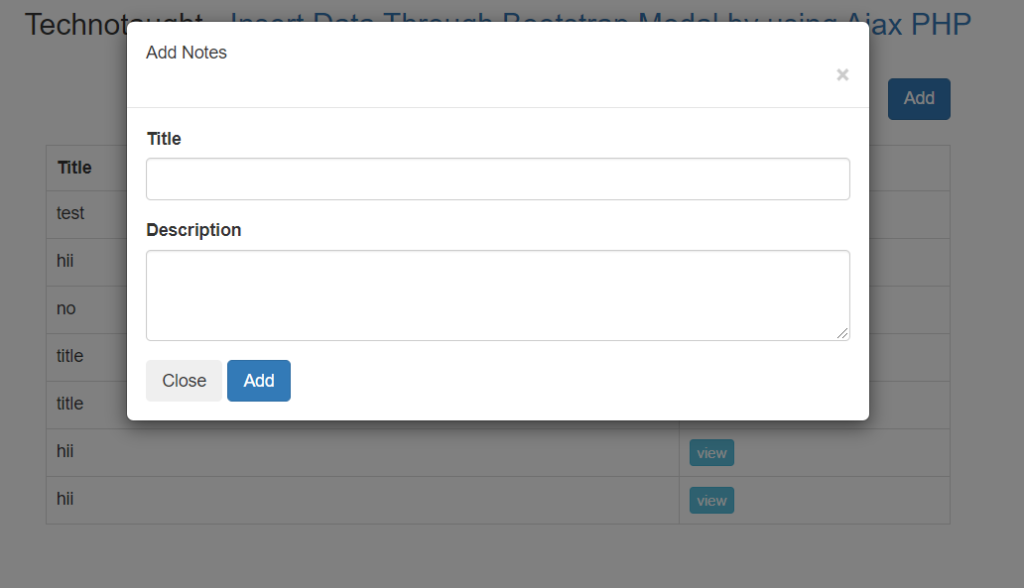
Now, we will create five files here for the login system.

 1. **db.php –** Connection file contains the connection code for database connectivity
 2. **index**.**php –** Contain all html, php, ajax code
 3. **insert.php –** php code of insert and view data.
![](https://technotaught.com/wp-content/uploads/2021/01/Insert-in-php-1024x588.png)

![](https://technotaught.com/wp-content/uploads/2021/01/Insert-in-php-view.png)

### Source Code

#### Creating the DB File

After creating the table, we need to create a PHP script in order to connect to 
the MySQL database server. Let’s create a file named “db.php” and put the following
code inside it

    ```php
    <?php 
    $con = mysqli_connect("localhost","root","","test");
    ?>
    ```

#### index.php

    ```php
    <?php
    include('db.php');
    $query = mysqli_query($con, "SELECT * FROM files ORDER BY ID DESC");
    ?>
    <!DOCTYPE html>
    <html lang="en">
    <head>
        <meta charset="UTF-8">
        <meta name="viewport" content="width=device-width, initial-scale=1.0">
        <title>Insert Data in PhP</title>
        <script src="https://ajax.googleapis.com/ajax/libs/jquery/2.2.0/jquery.min.js"></script>
        <link rel="stylesheet" href="https://maxcdn.bootstrapcdn.com/bootstrap/3.3.6/css/bootstrap.min.css" />
        <script src="https://maxcdn.bootstrapcdn.com/bootstrap/3.3.6/js/bootstrap.min.js"></script>
        <script src="https://cdnjs.cloudflare.com/ajax/libs/sweetalert/2.1.2/sweetalert.min.js"></script>
    </head>
    <body>
        <div class="container">
            <h3 align="center">Technotaught - <a href="https://technotaught.com/">Insert Data Through Bootstrap Modal by using Ajax PHP</a></h3>
            <br />
            <div class="col-md-2">
            </div>
            <div class="col-md-8">
                <div class="table-responsive">
                    <div align="right">
                        <button type="button" class="btn btn-primary text-right m-5" data-toggle="modal" data-target="#staticBackdrop">Add</button>
                    </div>
                    <br />
                    <div id="employee_table">
                        <table class="table table-bordered">
                            <tr>
                                <th width="70%">Employee Name</th>
                                <th width="30%">View</th>
                            </tr>
                            <?php while ($row = mysqli_fetch_array($query)) { ?>
                                <tr>
                                    <td><?php echo $row['title'] ?></td>
                                    <td><input type="button" name="view" value="view" id="<?php echo $row["id"]; ?>" class="btn btn-info btn-xs view_data" /></td>
                                </tr>
                            <?php } ?>
                        </table>
                    </div>
                </div>
            </div>
        </div>
        <!-- ############################################################################################### -->
        <!-- Add Data Modal -->
        <div class="modal fade" id="staticBackdrop" data-backdrop="static" data-keyboard="false" tabindex="-1" aria-labelledby="staticBackdropLabel" aria-hidden="true">
            <div class="modal-dialog">
                <div class="modal-content">
                    <div class="modal-header">
                        <h5 class="modal-title" id="staticBackdropLabel">Add Notes</h5>
                        <button type="button" class="close" data-dismiss="modal" aria-label="Close">
                            <span aria-hidden="true">×</span>
                        </button>
                    </div>
                    <div class="modal-body">
                        <div class="form-group">
                            <label for="exampleFormControlInput1">Title</label>
                            <input type="text" class="form-control" id="title" name="title">
                        </div>
                        <div class="form-group">
                            <label for="exampleFormControlTextarea1"> Description</label>
                            <textarea class="form-control" id="description" name="description" rows="3"></textarea>
                        </div>
                        <button type="button" class="btn btn-secondary" data-dismiss="modal">Close</button>
                        <button type="submit" id="add_data" class="btn btn-primary" value="Add">Add</button>
                    </div>
                </div>
            </div>
        </div>
        </div>

        <!-- ############################################################################################### -->
        <!-- View Data Modal-->
        <div id="dataModal" class="modal fade">
            <div class="modal-dialog">
                <div class="modal-content">
                    <div class="modal-header">
                        <button type="button" class="close" data-dismiss="modal">×</button>
                        <h4 class="modal-title">Employee Details</h4>
                    </div>
                    <div class="modal-body" id="employee_detail">
                    </div>
                    <div class="modal-footer">
                        <button type="button" class="btn btn-default" data-dismiss="modal">Close</button>
                    </div>
                </div>
            </div>
        </div>
        <!-- ############################################################################################### -->

    </body>
    </html>
    <script>
        $(document).ready(function() {
            // add
            $(document).on("click", "#add_data", function() {
                var title = $('#title').val();
                var description = $('#description').val();
                $.ajax({
                    url: "insert.php",
                    type: "POST",
                    catch: false,
                    data: {
                        added: 1,
                        title: title,
                        description: description
                    },
                    success: function(dataResult) {
                        var dataResult = JSON.parse(dataResult);
                        if (dataResult.status == 1) {
                            $('#staticBackdrop').modal().hide();
                            swal("Setting Updated!", {
                                icon: "success",
                            }).then((result) => {
                                location.reload();
                            });
                        }
                    }
                });
            });
            $(document).on('click', '.view_data', function() {
                //$('#dataModal').modal();
                var employee_id = $(this).attr("id");
                $.ajax({
                    url: "insert.php",
                    method: "POST",
                    data: {
                        employee_id: employee_id
                    },
                    success: function(data) {
                        $('#employee_detail').html(data);
                        $('#dataModal').modal('show');
                    }
                });
            });

        });
    </script>
    ```

#### insert.php

File contain php code that insert and view data.

    ```php
    <?php 

    include('db.php');
    // ##################################################################
    // Add Data
    if(isset($_POST['added'])){
        $title = $_POST['title'];
        $description = $_POST['description'];
        $query = "INSERT INTO files(title,description,uploaded_on) VALUES ('$title','$description',NOW())";
        if (mysqli_query($con,$query)){
            echo json_encode(array("status" => 1));
        }
        else{
            echo json_encode(array("status"=>2));
        }
    }
    // ##################################################################
    // View Data
    if(isset($_POST["employee_id"]))  
     {  
          $output = '';  
          $query = "SELECT * FROM files WHERE id = '".$_POST["employee_id"]."'";  
          $result = mysqli_query($con, $query);  
          $output .= '  
          <div class="table-responsive">  
               <table class="table table-bordered">';  
          while($row = mysqli_fetch_array($result))  
          {  
               $output .= '  
                    <tr>  
                         <td width="30%"><label>Name</label></td>  
                         <td width="70%">'.$row["title"].'</td>  
                    </tr>  
                    <tr>  
                         <td width="30%"><label>Address</label></td>  
                         <td width="70%">'.$row["description"].'</td>  
                    </tr>  
                    <tr>  
                         <td width="30%"><label>Address</label></td>  
                         <td width="70%">'.$row["uploaded_on"].'</td>  
                    </tr>  
               ';  
          }  
          $output .= '  
               </table>  
          </div>  
          ';  
          echo $output;  
     }  
    ?>
    ```

#### Creating the Database Table

Execute the following SQL query to create the _users _table in your MySQL database.

Database name should be **test**.

    ```language-sql
    -
    --  Database  `test`
     -- Table `files`  
     -- 

    CREATE TABLE `files` (
      `id` int(11) NOT NULL AUTO_INCREMENT,
      `title` varchar(255) NOT NULL,
      `description` varchar(255) NOT NULL,
      `uploaded_on` datetime NOT NULL,
      PRIMARY KEY (`id`)  
    ) ENGINE=InnoDB DEFAULT CHARSET=latin1;

    --
    -- Dumping data for table `files`
    --

    INSERT INTO `files` (`id`, `title`, `description`, `uploaded_on`) VALUES
    (1, 'hii', 'how ar u', '2021-01-02 15:38:32'),
    (2, 'hii', 'bye', '2021-01-02 15:41:29'),
    (3, 'title', 'description', '2021-01-02 15:52:42'),
    (4, 'title', 'description', '2021-01-02 15:53:03'),
    (5, 'no', 'yes', '2021-01-02 15:55:11'),
    (6, 'test', 'how are you guys', '2021-01-02 20:28:49');
    ```

### Share this:

 * [  X ](https://technotaught.com/insert-data-in-php-ajax-mysql-by-using-bootstrap-modal/?share=twitter)
 * [  Facebook ](https://technotaught.com/insert-data-in-php-ajax-mysql-by-using-bootstrap-modal/?share=facebook)
 * [More](https://technotaught.com/insert-data-in-php-ajax-mysql-by-using-bootstrap-modal/#)

 * [  WhatsApp ](https://technotaught.com/insert-data-in-php-ajax-mysql-by-using-bootstrap-modal/?share=jetpack-whatsapp)
 * [  LinkedIn ](https://technotaught.com/insert-data-in-php-ajax-mysql-by-using-bootstrap-modal/?share=linkedin)
 * [  Email ](https://technotaught.com/insert-data-in-php-ajax-mysql-by-using-bootstrap-modal/?subject=%5BShared%20Post%5D%20Insert%20Data%20in%20PHP%20Ajax%20MySQL%20By%20Using%20Bootstrap%20Modal&body=https%3A%2F%2Ftechnotaught.com%2Finsert-data-in-php-ajax-mysql-by-using-bootstrap-modal%2F&share=email)
 * [  Reddit ](https://technotaught.com/insert-data-in-php-ajax-mysql-by-using-bootstrap-modal/?share=reddit)
 * [  Tumblr ](https://technotaught.com/insert-data-in-php-ajax-mysql-by-using-bootstrap-modal/?share=tumblr)
 * [  Pinterest ](https://technotaught.com/insert-data-in-php-ajax-mysql-by-using-bootstrap-modal/?share=pinterest)
 * [  Telegram ](https://technotaught.com/insert-data-in-php-ajax-mysql-by-using-bootstrap-modal/?share=telegram)
 * [  Print ](https://technotaught.com/insert-data-in-php-ajax-mysql-by-using-bootstrap-modal/#print?share=print)

### _Related_